IP protection system
We provided HESABATE with an IP protection system linked to your account. No one can be able to access your account from anywhere outside the specified IP range.
What is IP?
IP Address is a number and it represents the address of your device on the Internet, similar to the phone number through which people can call you.
Through IP, anyone can locate your site, your country, your city or home by placing only the IP address with Search Maps.
Each device has 2 IPs, One internal and the other is external
1- Internal IP: It is the one that is inside your "home network" and is like this according to your country 192.168.0.1, and to know your internal IP Click on the keyboard :
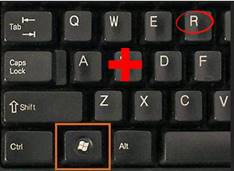
Then type (cmd) it will come in black screen then you write (ipconfig)
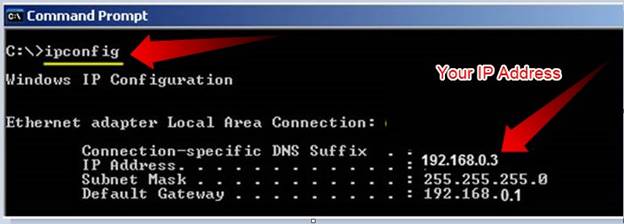
2- External IP: It is the IP What we use to protect you from penetration, every device can not connect to the Internet unless it has a communication port and this is called an external IP, so every device on the Internet has its own External IP example 80.51.36.41
You can find out External IP number by opening the site http://whatismyipaddress.com/, which tells you your private IP once you open it.
What is the benefit of External IP protection in HESABATE:
The protection system activated through the external IP in HESABATE, which links to your IP account.
once this feature is activated your account is linked to your external IP with all its contents including the data saved on the server for your account, it is not possible to log in or see any information related to your account And in any way whatsoever without the user being inside this domain.
That is, if you activate this IP protection system while you are at work, you will not be able to access the account at your home or anywhere else in the world!!
This applies to any other persons so no one in the world will be able to access your account even if he knows the username and password.
In addition, even if he breaches your account he will not be able to obtain or modify any information unless he is in the place where you installed the IP With it.
Knowing that there is a protection system installed on HESABATE that guarantees 99% prevention of any breach of your account, and the protection system through the IP guarantee that no one will break into your account 100%.
How to activate IP protection External in my calculations:
By opening the users and privileges screen
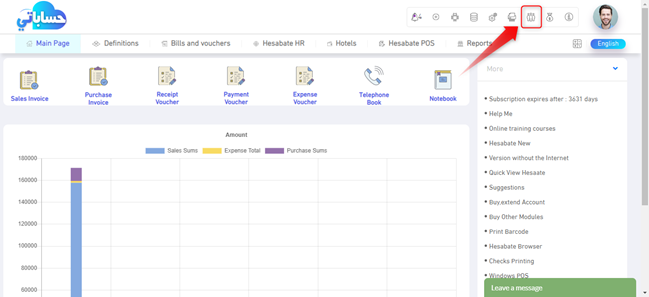
By clicking on the users and privileges shortcut as in the previous image, the following screen opens for you, click on a search, a screen appears that shows all users or one user if it is a new account or you have not purchased a new user.
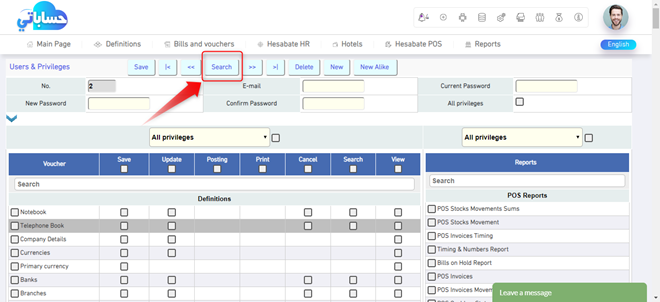
Choose the user you want to protect and prevent access to the program through it or see any data that done before through it by clicking on it
After selecting the user, open the additional options by clicking on the blue arrow and then click on (IP protection) option) see following photo)
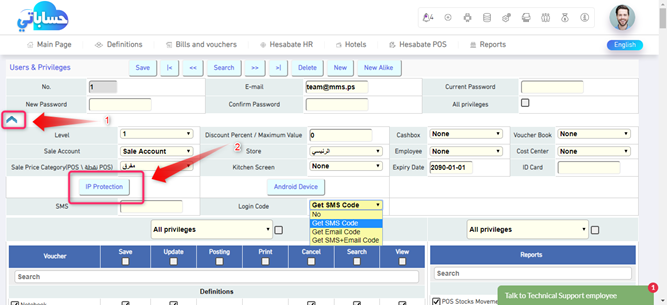
Once you click on this option, the following screen will appear:
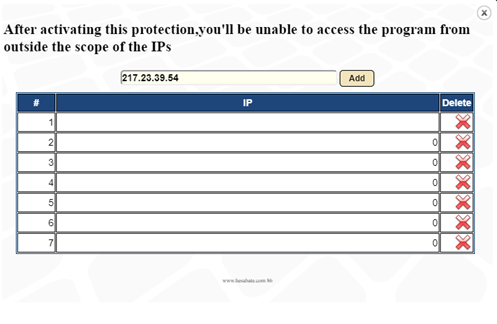
A warning appears at the top of the screen that if you have installed IP Your external account will not be able to access your account from anywhere outside the scope of this IP
You can install IP by clicking Add
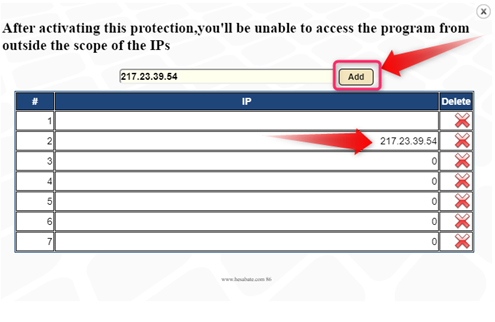
Your IP number is shown first, and then you can add more IP numbers for other places you would like to open the program while you are in it if you know IP numbers for those places.
In addition, in case you want to uninstall any IP You already installed before, you just have to click on the red (X) next to the selected IP.
Once you click on Add, you have linked your account to this IP.
Now simply turn off the screen and enjoy the protection.
How to cancel IP protection Out of the IP range:
In the event of change the IP of Your account due to a change in the internet provider or for any reason, or in case you had to enter the program from anywhere outside the IP scope, You can uninstall and reinstall it later from the same location you added.
In the event that you are unable to enter the program for any reason, contact the technical support via e-mail:
support@hesabate.com